How it works, for IT
Set the policy once. Hear about the exceptions.
Appholm is where people in your organisation publish the small tools they build. This page is for the people who run IT: where it sits, what you control, and what reaches you.
watch · 1 min 24 s
A tool, from a file on your laptop to the people who need it.
the walkthrough · captions on
Transcript
- 0:02Here's how a tool gets from a file on your laptop to the people who need it, with Appholm.
- 0:08Start with Publish.
- 0:09Drop in a single HTML file, or a zip of a static site, and give it a name.
- 0:15A moment later it has its own private link.
- 0:17Until you share it, only you can open it.
- 0:20Or skip the upload, and tell your agent: publish this to Appholm.
- 0:23Sharing works like a document.
- 0:26Add people or groups straight from your directory, and they open the link already signed in with their work account.
- 0:33If someone without access follows the link, they can ask for it.
- 0:36The request comes to you, the owner, not to IT.
- 0:40When the tool changes, upload a new version.
- 0:42The current one stays live until the new one is ready, and every earlier version is kept, so you can roll back whenever you need to.
- 0:49For IT, it starts with a choice: Open, Balanced, or Locked down.
- 0:54That policy decides what publishes straight away, and what waits for review.
- 0:58So the review queue holds only the exceptions, and most days it's empty.
- 1:02Everything that happens, by a person or by Appholm itself, goes into an audit log written in plain sentences.
- 1:09It can be filtered and exported, and nothing in it can be edited or deleted.
- 1:13That's the whole product: publish, share, review, and audit.
- 1:17No platform to learn.
- 1:19Appholm, from Ether-X.
- 1:19Ask for an invitation at appholm.com.
01where it sits
Your people, your directory, and one address per app.
Appholm has two parts. The console is where people publish, share and review. The apps themselves are served somewhere else, each from an address of its own.
- Nothing to install: People use a browser and the work account they already have. Microsoft Entra is the only sign-in Appholm supports for now.
- Apps kept apart: One app cannot read another app’s cookies or storage, and no app runs on the address that serves the console.
- Hosted in the UK, or on your network: Run by Ether-X in the UK. Apps can also be served from your own machines, on your own domain.
Your organisation
Appholm, hosted in the UK
quote-builder--kestrel.ether-x.appportal.appholm.comyour organisation on one side, Appholm on the other · each app on an address of its own
02set it up once
About ten minutes, then it runs itself.
First run is three steps. Everything in them can be changed later.
- Connect Microsoft Entra: An administrator approves Appholm in your tenant, and it reads your people and groups. Everyone signs in with their work account, so there is nothing to set up for them.
- Choose how strict to be: Open, Balanced or Locked down. Balanced is the one we recommend: simple apps publish straight away, and anything that reaches further waits for you.
- See what each choice means: Three lists spell it out before you commit: what publishes without you, what waits for your review, and what is never allowed. They name kinds of app that are still on the way, so the rule is set before they arrive.
- Ownership and tidy-up: Four switches keep Appholm tidy without you: deputy owners, archiving apps nobody opens, moving a leaver’s apps, and flagging old container images. The last waits for container apps.
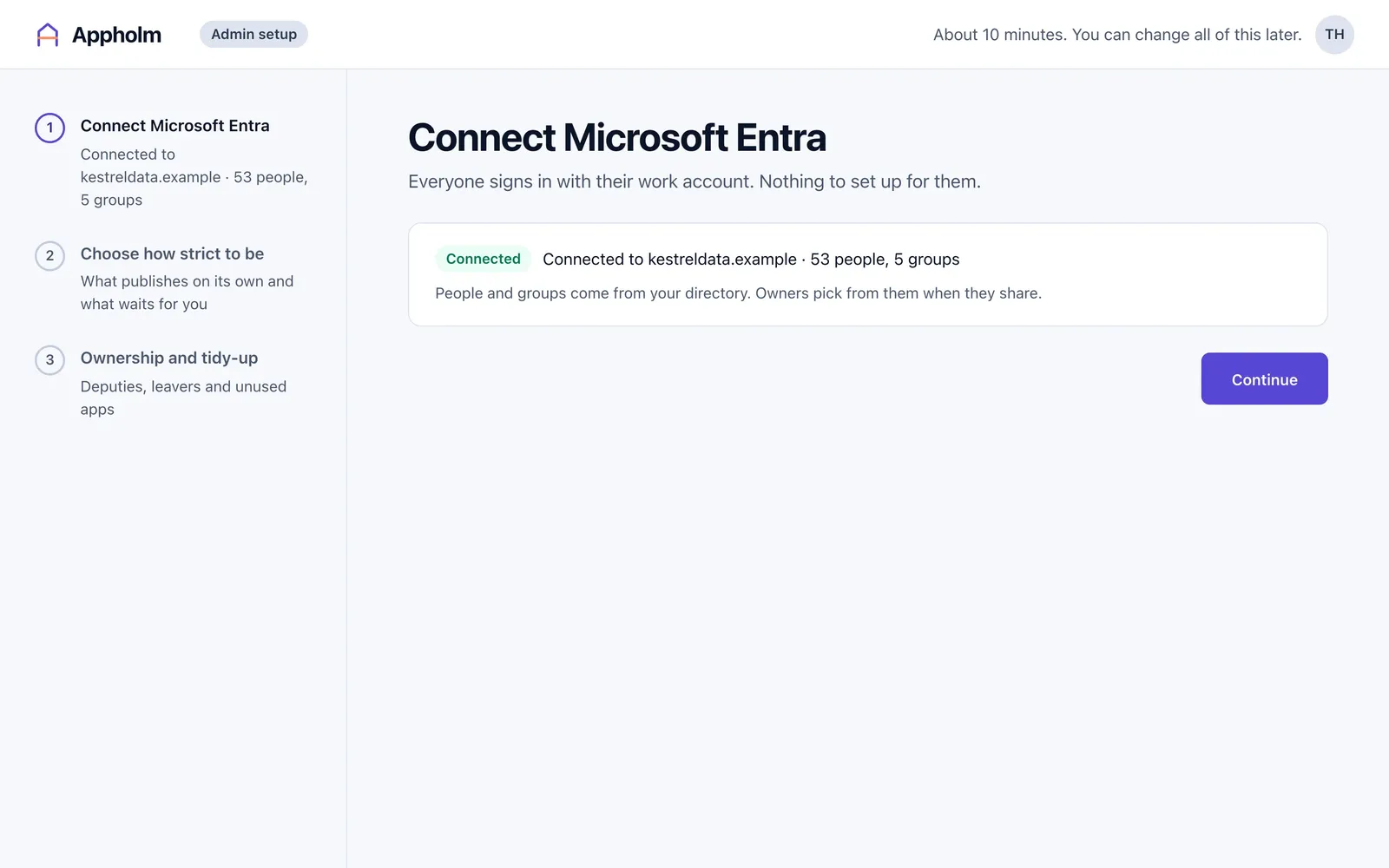
captured from the product · step one of three: connected, with 53 people and 5 groups from the directory
03publishing
Every publish takes the same path.
From the console, a terminal or an agent, a new app or a new version is checked against your policy before anyone has to look at it. This is what Balanced does.
- The owner is told straight away: A file is checked as it is dropped in, and the publish screen says what will happen before the button is pressed. Here: no approval needed.
- Each rule is Allow, Review or Block: The policy page has a row for each rule. Sharing inside the company is allowed, sharing with guests waits for a review, and public links are blocked. Change a rule and the page shows what it would do to apps today, before you save.
- Every version is kept: An update that asks for nothing new goes live at once. The version before stays one click away, and each app says what it can do: what it runs as, what it connects to and who can open it.
- Someone publishes or updates
- Checked against your policy
- Live, waiting for IT, or not allowed
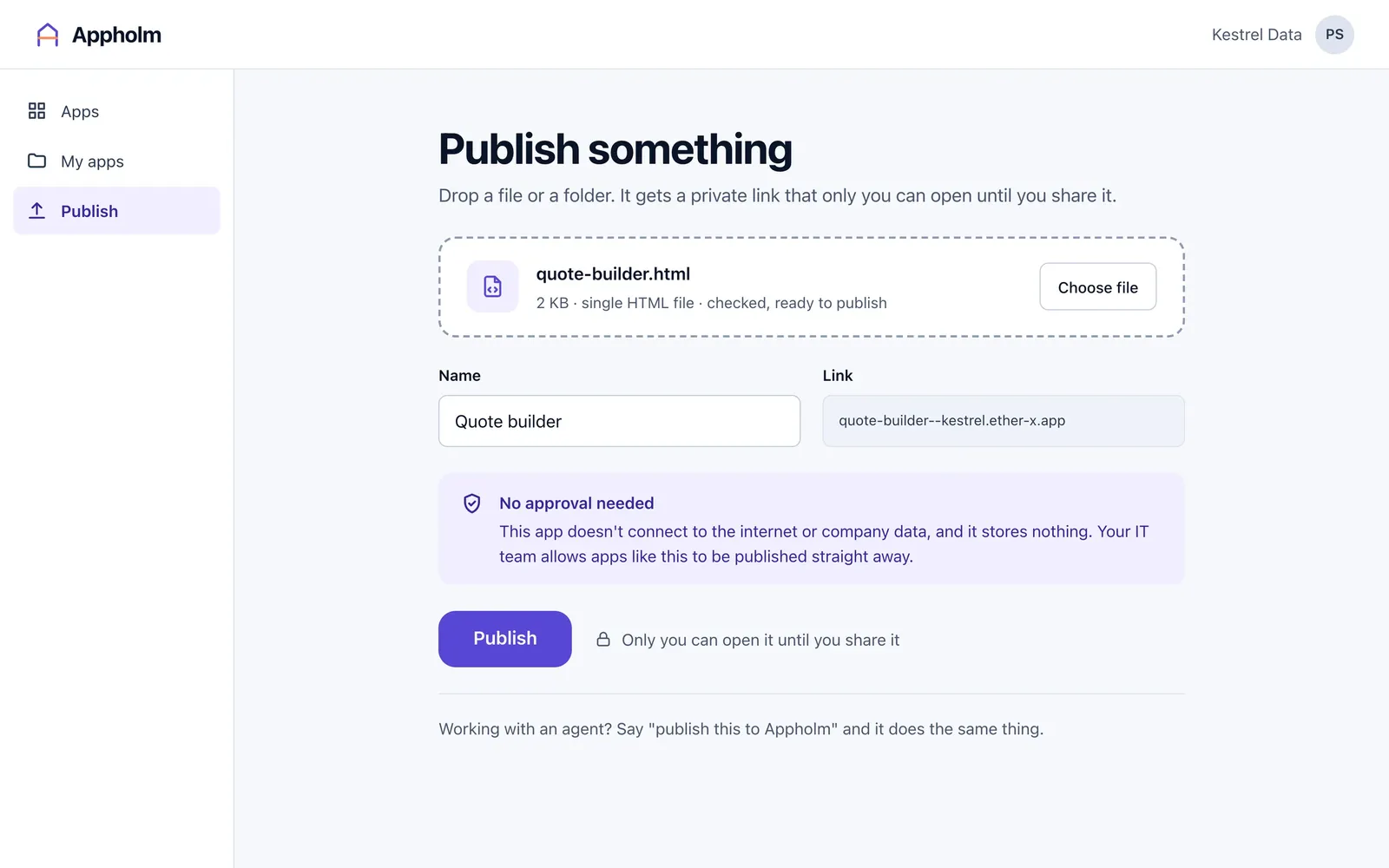
captured from the product · quote-builder.html dropped in and checked, no approval needed
04who can open what
Private until shared, and the owner decides.
A new app opens for its owner and nobody else. Sharing it is the owner’s job, with the people and groups already in your directory.
- Shared like a document: People, groups, and a link to copy. A deputy owner is named at the first share, so an app is never left with one person.
- No access? Ask the owner: A colleague who follows the link without access sees who owns the app and can ask for it, with a note.
- The owner answers, not IT: The request arrives with the owner, in the console and by email. Give access, and the link works for that colleague from then on.
- Admins are on the list too: IT can see that an app exists, who owns it and who can open it. Opening it still needs the owner to give access.
- Guests follow your policy: Sharing with someone outside your organisation can be allowed, reviewed or blocked. Guest access ends after 30 days unless it is renewed.
- Access removed is access gone: When an owner removes someone, the app stops opening for them within seconds.
- Someone follows a link
- Their work account
- The access list
- The app opens, or Request access
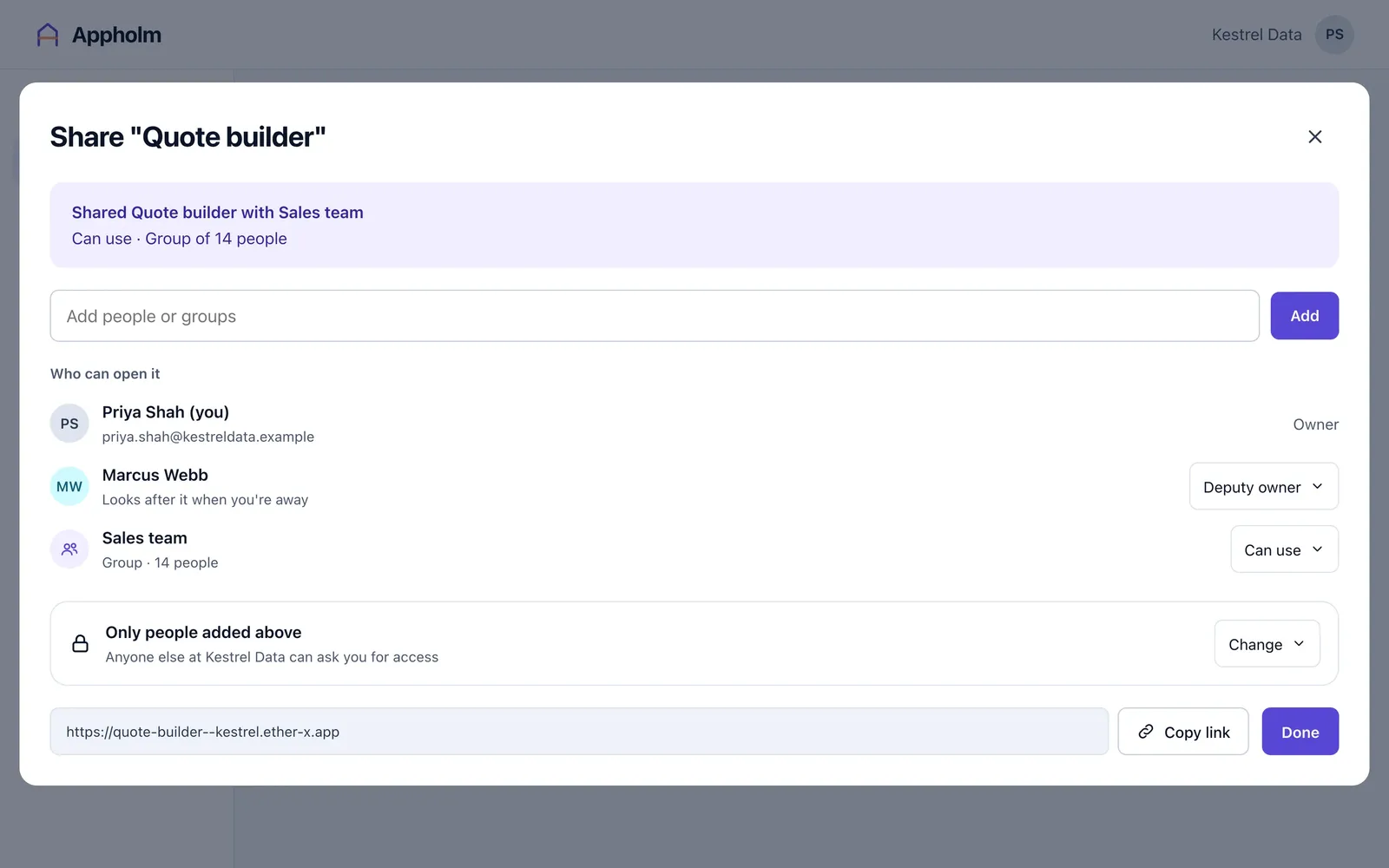
captured from the product · the share window: owner, deputy owner and a group
05reviews
Only the exceptions reach you.
Most updates never come near IT. The ones that do arrive on one screen, with the reason attached.
- A short queue: Two things are waiting. Underneath is the count that matters: the updates published this month without needing you.
- Why it is here: Each review opens with the rule that sent it to you. Here the Balanced policy sends sharing with guests for review, and nothing else about the app changed.
- What is new, what is the same: The change is one line: shared with a guest from outside the company. Automatic checks confirm the app itself did not change and everyone else keeps access.
- Approve or decline, with a note: The owner sees your note with the decision. Either way it goes on the audit log.
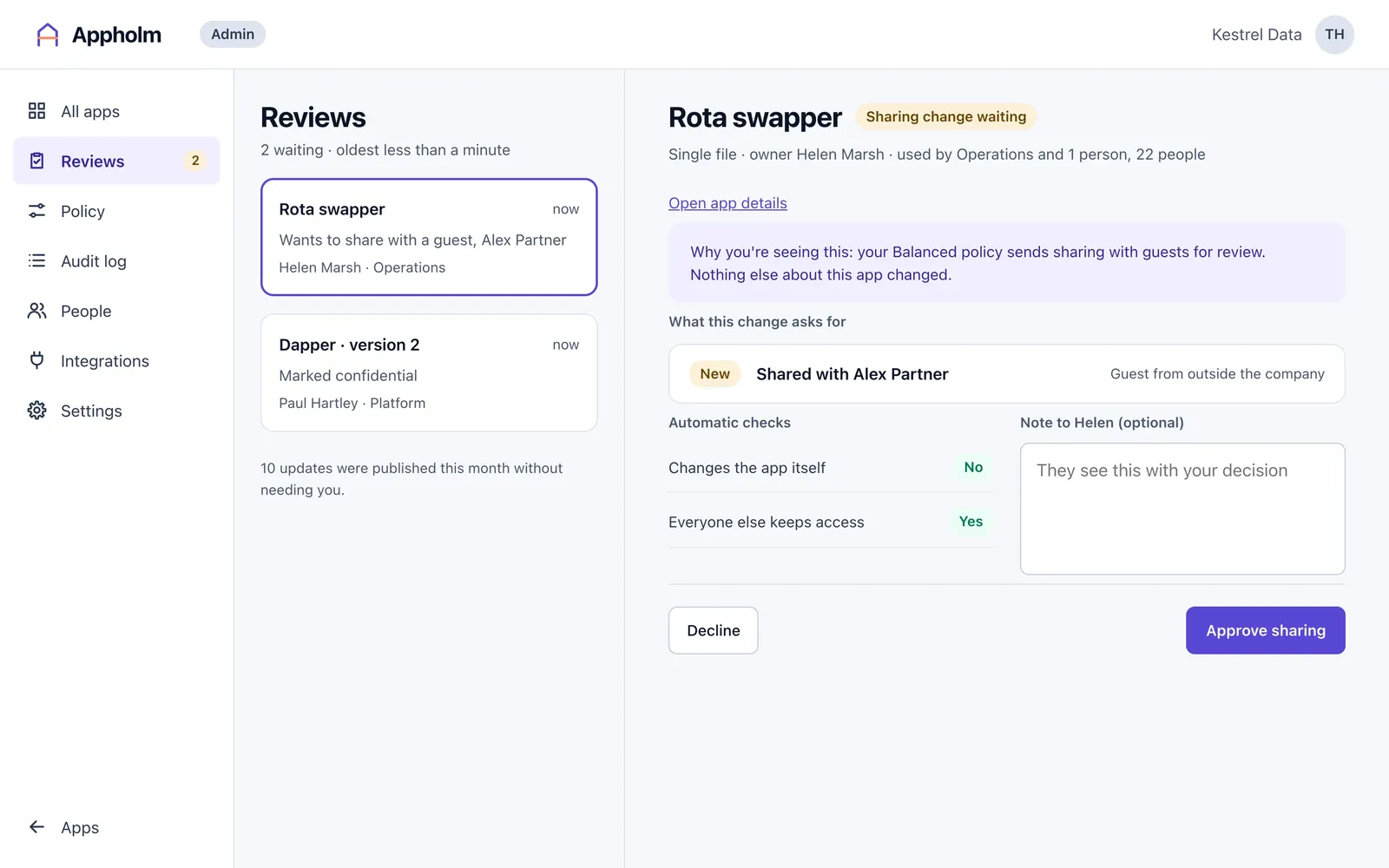
captured from the product · two reviews waiting, the first open
06see everything
Every app, every action, in plain English.
Small tools usually live where IT cannot see them. Here they are in one list, and everything that happens to them is written down.
- Every app at a glance: How many apps are published, how many are waiting for a review, and how many need attention. Filters pick out the apps shared with everyone or sitting idle.
- Who owns it, who can open it: Each row gives the owner and deputy owner, the type, the status, who can open it, what it connects to and when it was last used. Export for audit gives you the same list as a file.
- An audit log in sentences: Every action, by a person or by Appholm itself, is one line: when, who, what happened and the detail. The approval from the last chapter is there, with its note.
- Filter it, export it, check it: Filter by time, person, app or kind of event, and export what you find. Nothing in the log can be edited or deleted, and each entry is chained to the one before, so an export can be checked.
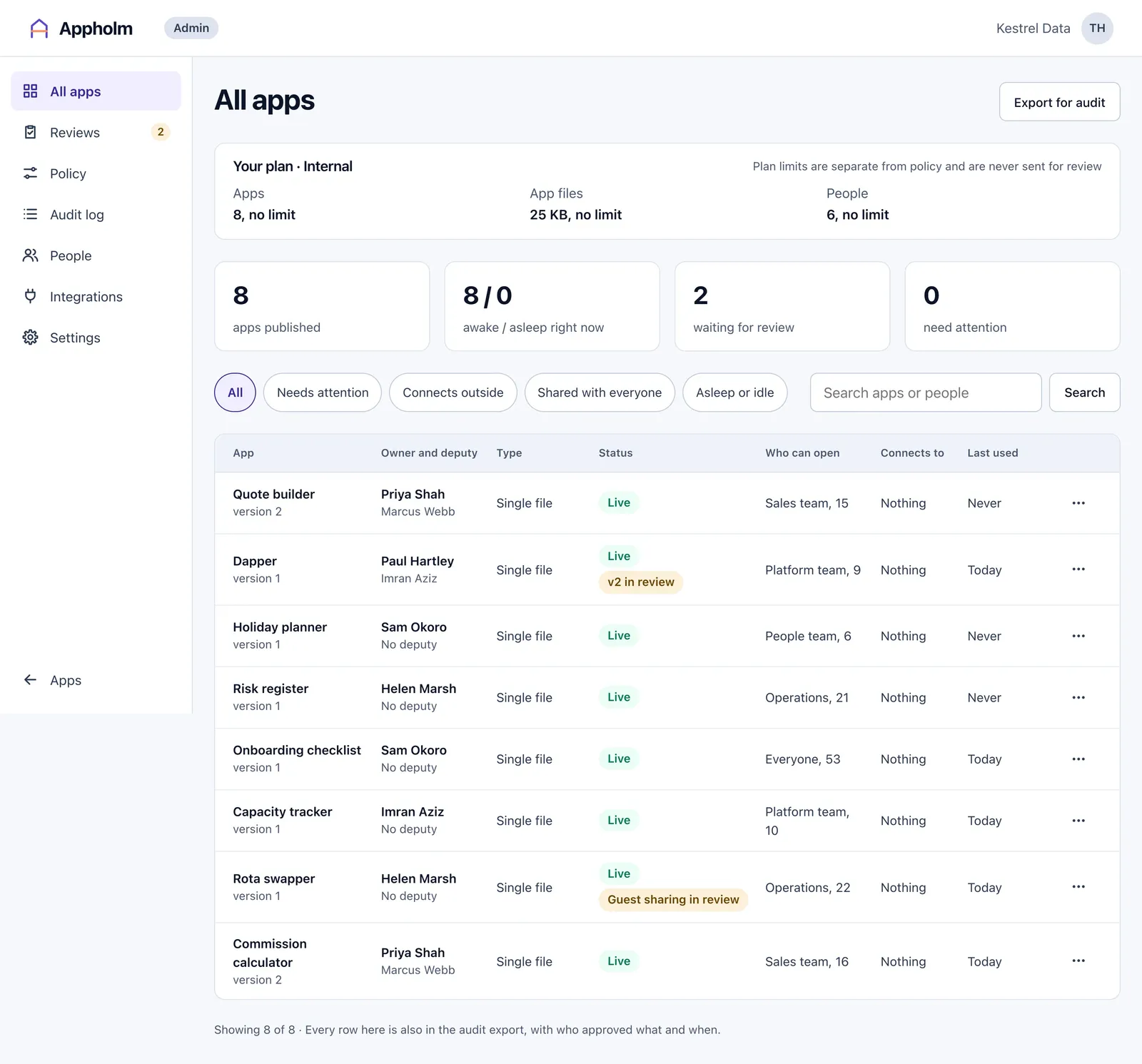
captured from the product · every app with its owner, status and who can open it
07tidy-up
It tidies up after itself.
Small tools outlive the reason they were built, and the people who built them move on. The rules you set at first run deal with both. These are the defaults.
- Rules you can change: The four switches from first run live on the policy page. Turn one off, or change your mind later.
- When someone leaves: Appholm notices when someone is no longer in your directory. Has left, on the People page, does the same thing by hand.
- Day 0: last opened
- Day 76: owner and deputy owner warned
- Day 87: a second warning
- Day 90: archived
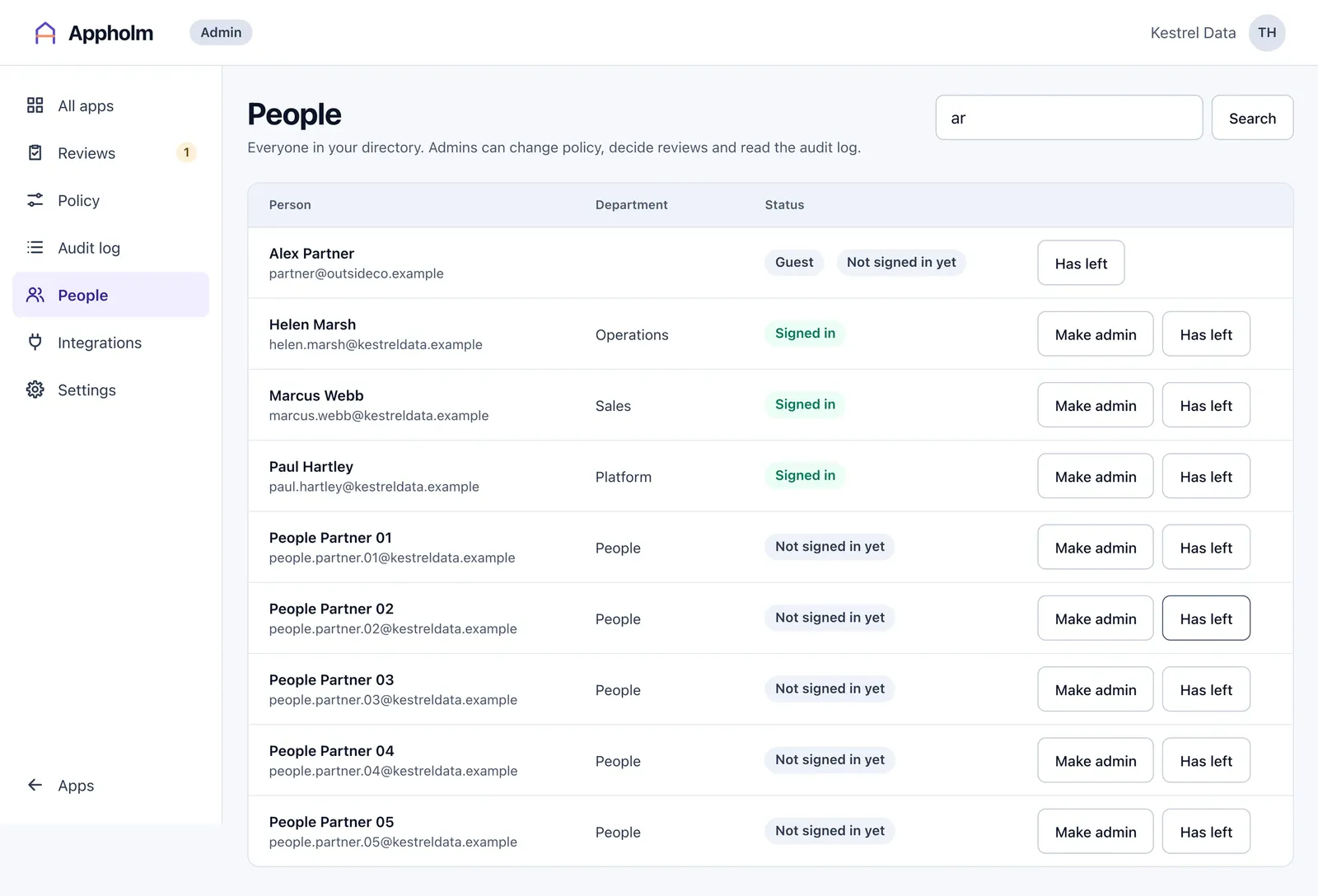
captured from the product · people from the directory, with Has left on each row
08your own infrastructure
Your apps, your domain, your machines.
Your apps are served by us, on a shared domain, unless you would rather they came from your own network. Run our runner on a machine of yours and they are served from there, on an address you choose. It is one small program. It dials out to Appholm, so there is nothing to open in your firewall. We create the runner for you and send its token and the runbook.
- Name your domain: Give Appholm a domain of yours and every app moves to an address under it. An internal name, one that only resolves inside your network, works and moves the apps straight away.
- Three things for your IT team: Point a DNS wildcard at the runner, put a certificate for it on the runner, and set the runner up from the runbook. A public domain also needs one DNS record, so Appholm can confirm it is yours.
- See that it is connected: Settings lists your runners, their state and how many apps each is serving. Once your apps are on your own domain, only your own runners serve them.
- What the runner receives: Only your organisation’s apps, their access lists and revocations.
- What it never holds: No signing keys, no database credentials and none of our certificates.
- If the console cannot be reached: Apps keep serving from the runner’s own copy to people who are already signed in.
- What you need: A Linux machine with a few gigabytes of disk, outbound HTTPS, a wildcard DNS name and a certificate for it.
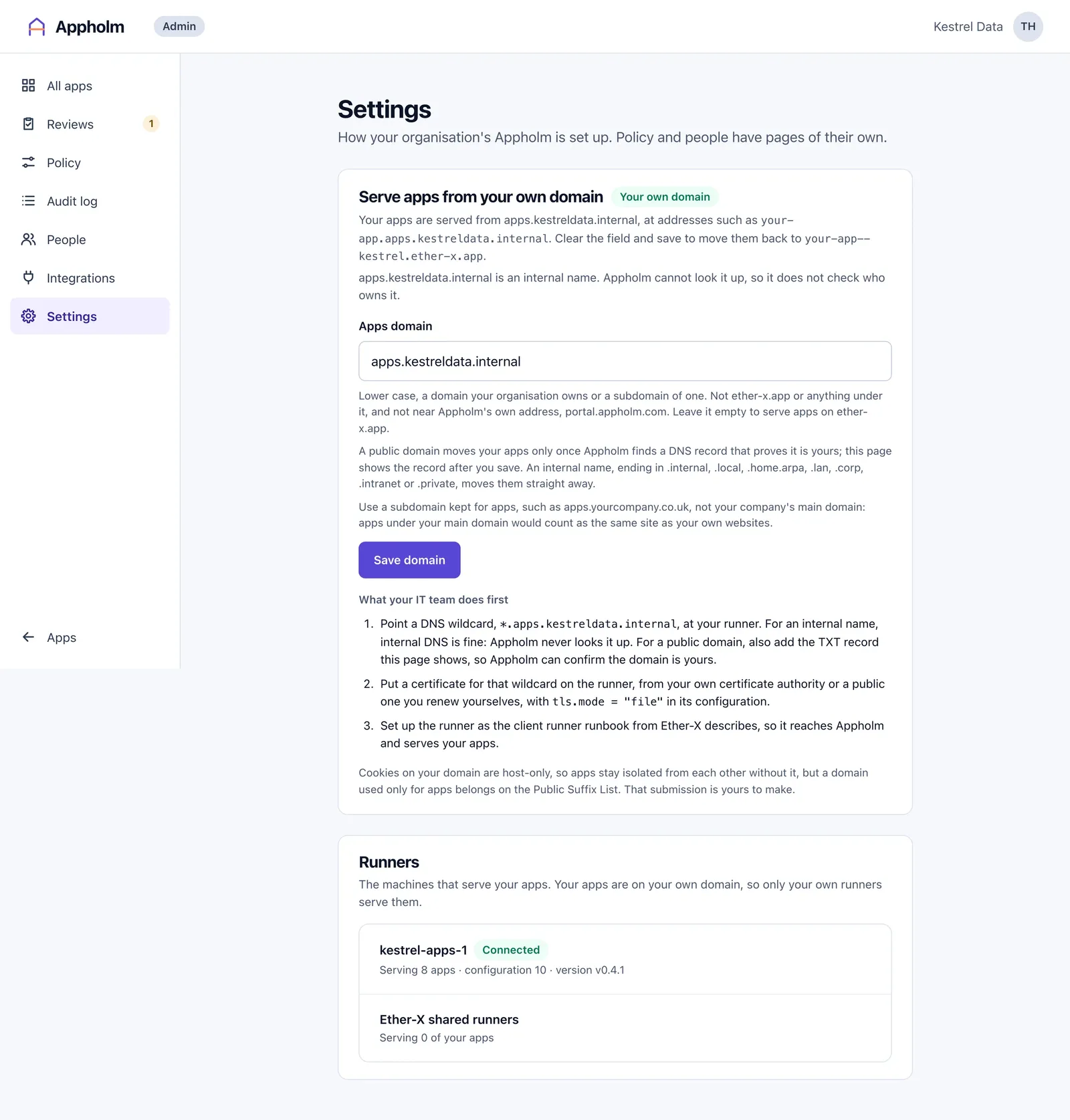
captured from the product · apps served from the organisation’s own domain, and its runner connected
09integrations
It fits what you already run.
Appholm tells your other systems what has changed, and lets them register an app or ask for access on a person’s behalf. ServiceNow is the first with a written guide.
- Keys that carry only what you tick: Each system gets a key of its own with the scopes it needs and no more. A key can be given an end date, and revoking one takes effect straight away.
- Webhooks, signed: Appholm posts every matching change to an address you give it, signed with a secret shown once. Send a test event, pause it, rotate the secret, and read the delivery log.
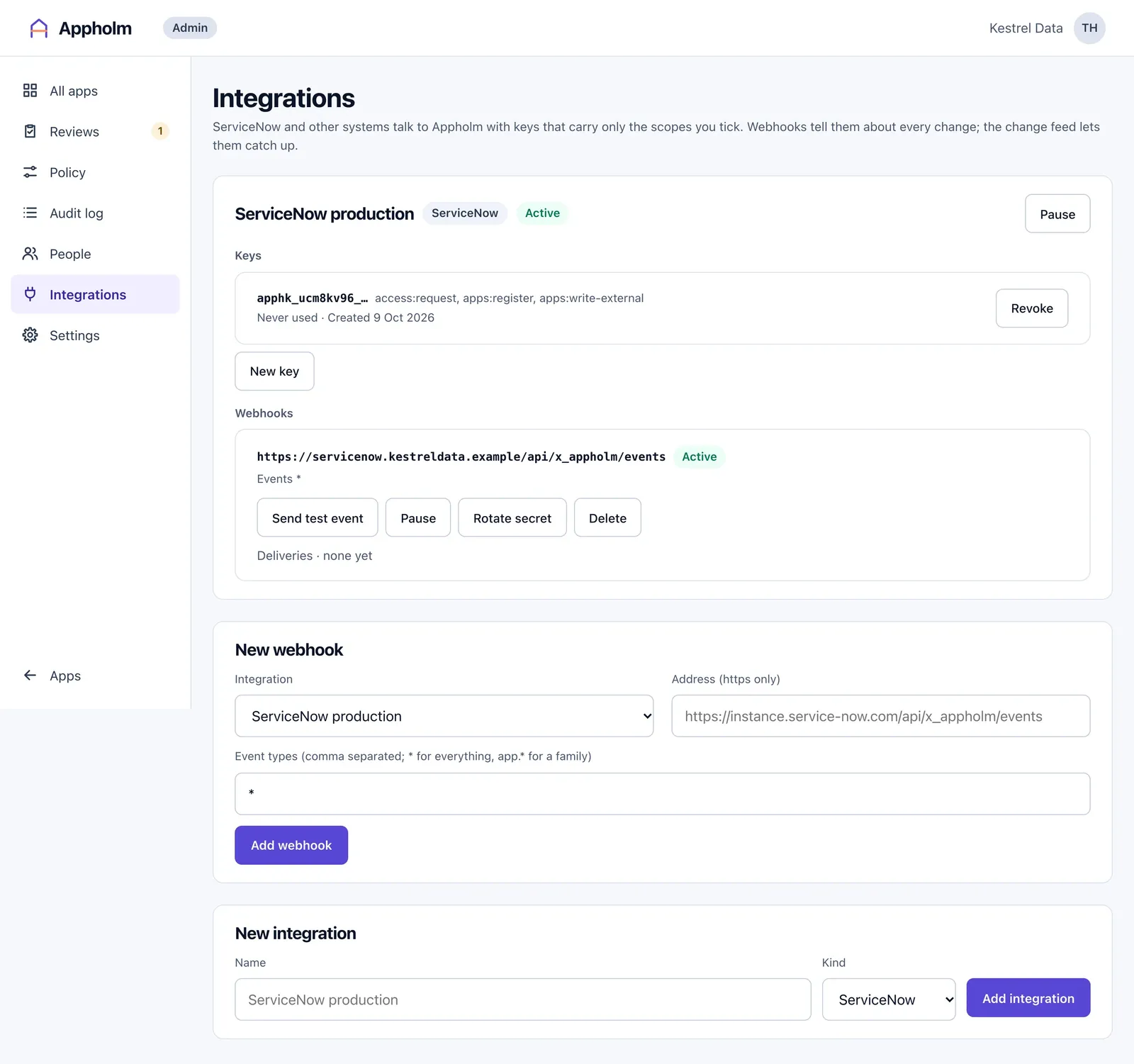
captured from the product · a ServiceNow key with three scopes, and a signed webhook